Fusion draws Host and Service state from every Nagios XI and Nagios Core server you run, and alert data from Nagios Log Server and Nagios Network Analyzer, onto one screen.
Free 30-day trial with the full feature set. Installs on your own server, on premises.

Trusted by 10K+ Teams Worldwide


Checks, thresholds, and notifications stay where you configured them. Fusion reads the results over HTTP or HTTPS and puts them side by side, so adding it changes nothing about how your existing servers run.
Polls each fused server on an interval you set, stores the results, and renders them as dashboards, rotating Views, and per-server Overview pages with Alert History.
Gives one login to reach them all, with the ability to enable automatic login to Nagios XI servers on a per-user, per-server basis.
Every check command, threshold, contact, notification, and escalation. Configuration is handled at each remote server, which is what keeps Fusion light as the number of servers grows.
Fusion does not run checks and does not send Host or Service notifications of its own.
Documentation: Managing Fused Servers In Nagios Fusion
Set a fused server’s collection method to Event-Based and it pushes alert data to Fusion in addition to the regular polling cycle, using the fusion-producer service on the fused server and the fusion-collector service on Fusion. Alert History reflects the pushed result, so a Critical raised seconds ago is on screen before the next poll comes round.
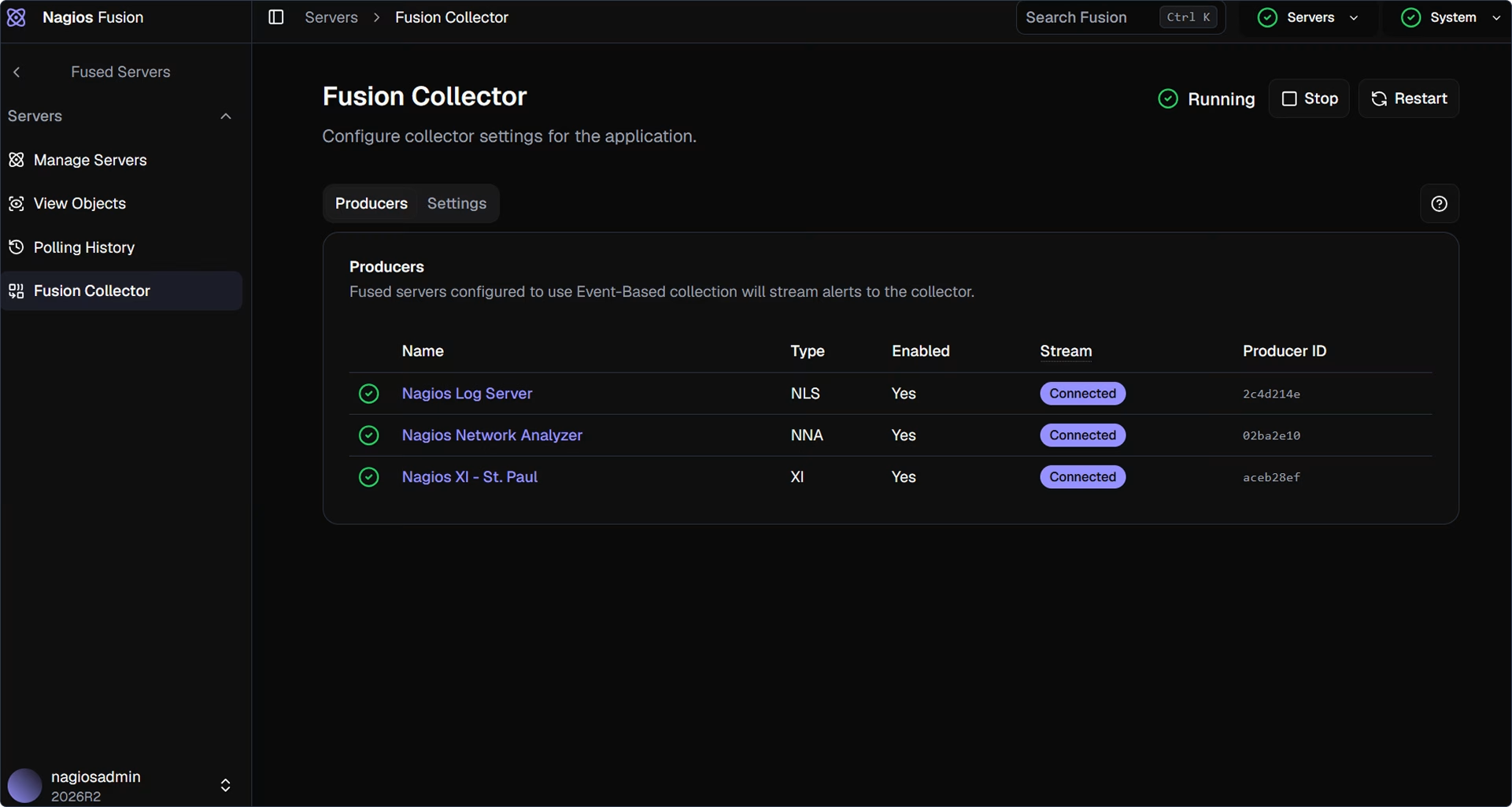
TCP 9000, configurable under Fused Servers > Fusion Collector in the Settings tab.
TLS supported. Add the Fusion certificate to each XI, Log Server, or Network Analyzer server.
Event-Based runs in addition to polling, not instead of it. Configured Alerts still reflects the last poll.
Fusion collects the ones your fused servers raise and keeps them somewhere you can search, which is the difference between knowing a server went Critical and knowing when, how often, and what it said.
Each fused server gets an Overview page carrying its CPU, memory, and root drive usage alongside Configured Alerts, with the metric, last status, last run, and last output for each.
Poll Now and Check auth now sit at the top of the page, so when a server looks stale you can force the question rather than wait out the interval.


Alert History records what ran, when it ran, the alert type, the state it landed in, and the output it returned, searchable and paged rather than capped at a handful of recent entries.
On a server using Event-Based collection, Alert History carries the pushed result while Configured Alerts reflects the last completed poll.
Force a poll of one fused server from its Overview page instead of waiting out the interval.
Re-test connectivity and credentials for a single server when its data looks stale.
Set how often Alert History refreshes under Administration > General > Data Display.
Documentation: Managing Fused Servers In Nagios Fusion
A regional team and a central operations desk want different things from the same five servers. Fusion gives each of them their own screen without giving either one the run of every server.
A dashboard is a set of dashlets drawing on your fused servers. Start from a ready-made template or from Blank, then resize and rearrange the dashlets. Dashboards belong to individual users and can be shared globally, so a network team and a database team can each keep their own without competing over one layout.
A View rotates through a selected set of dashboards on a timer. Point a wall display at one View and it cycles the screens an operations floor needs without anyone clicking.
Documentation: Using Dashboards In Nagios Fusion | How To Use Views In Nagios Fusion

Roles are created under Administration > User Management > Roles and carry both System Permissions and Server Permissions. Server Permissions decide which fused servers a Role can see and control, which is how you give a regional team its own servers and nothing else. Leaving a Dashboards or Views permission empty restricts the user to their own.
Any fused Nagios XI server a user has View access to is eligible for automatic login. With it enabled, clicking the server in Fused Servers > Manage Servers lands on that server's Home page, and View in XI opens the status detail page for the object you were looking at.
Copy users from one fused Nagios XI server and push them to others from the Centralized Management menu, instead of creating the same account by hand on each server. This arrived in Fusion 2026R1.
Endpoints cover users, roles, permissions, and server inventory, so onboarding a new fused server or a new operator can run from your own tooling. Authenticate with the API key in the Security section of your profile.
Documentation: Managing Users And Roles In Fusion
Running several monitoring servers is usually a deliberate choice: separate sites, separate business units, separate teams who each own their own configuration. Fusion leaves that arrangement intact and removes the part nobody wanted, which is checking each one in turn.
Each site continues to configure and tune its own instance. Central operations gets visibility across all of them without taking configuration away from the people who understand the environment.
Event-Based collection puts the alert on screen as the fused server raises it, and automatic login takes you from that alert into the Nagios XI server holding the detail in one click.
Server Permissions on a Role decide which fused servers each group sees, so a managed service provider or a multi-site operation can give every team a login without giving everyone everything.
Views rotate the dashboards an operations room needs on a timer, which turns a spare monitor into a status board nobody has to drive.
Install on a clean system. Fusion configures database components during installation, and putting it on a server with other applications already in place risks changing settings those applications depend on.
| Supported platforms | CentOS 9 and 10, RHEL 9 and 10, Oracle Linux 9 and 10, Debian 12 and 13, Ubuntu 24 |
|---|---|
| Polling | HTTP or HTTPS to each fused server. Open TCP 80 or TCP 443 for inbound traffic from the Fusion server. |
| Event-Based collection | TCP 9000 by default, configurable. Requires fused Nagios XI, Log Server, or Network Analyzer at 2026R2 or later. Nagios Core uses polling. |
| Installation | Internet access is required for installation and upgrades. |
| Authentication | Local accounts, or Active Directory and LDAP. Two-factor authentication by authenticator app or email code. |
Documentation: Nagios Fusion Admin Guide
Fusion is licensed per Fusion server, not per fused server, Node, or user. You buy it once and keep it. Annual Maintenance & Support covers updates and case support.
Centralized display for every Nagios server you run.
No. Fusion displays the state your fused servers report. Checks, thresholds, contacts, and notifications are configured on each Nagios XI, Core, Log Server, or Network Analyzer server, and continue to run there. Fusion is the screen you watch, not the engine doing the work.
No. Fusion will fuse Nagios Core servers at 4.0.7 or later using basic authentication, and a dedicated read-only account that can see all objects is the right way to connect one. Nagios XI servers fuse with a Fusekey taken from Admin > System Config > System Settings > Integration, or from the Integrations > Fusion menu.
For polling: Nagios XI 2009R1.3 or later, Nagios Core 4.0.7 or later, Nagios Log Server 2024R2 or later, and Nagios Network Analyzer 2026R1 or later. Event-Based collection needs Nagios XI, Log Server, or Network Analyzer at 2026R2 or later, and is not available for Nagios Core.
No. It runs alongside polling. Alert History shows the latest Event-Based result, while Configured Alerts reflects the most recent polling interval. Keep the polling interval tuned for the size of the fused server; larger Nagios XI and Core systems take longer to poll and benefit from a longer interval.
Three. A production install, a test or lab install for trying upgrades and configuration changes before they reach production, and a backup install held as a disaster recovery instance. The disaster recovery instance must stay non-operational until it takes over from the primary.
Yes, and it is a migration rather than an in-place upgrade. 2026R2 is a new front end on a new back end, so you install 2026R2 on a separate server, export user, server, and metadata tables from the 2024R1 through 2026R1 install, and import them into the new one. Plan it as a build alongside the existing server, not a Sunday evening upgrade.
The migration guide has the commands, and What's New in Nagios Fusion 2026R2 covers what changes once you are on it.
Yes. Fusion is $995 as a perpetual license, independent of the Nagios XI, Log Server, and Network Analyzer licenses on the servers it fuses. Sitewide Nagios XI packages include a Fusion license. See Nagios pricing plans for the full picture, or email [email protected].
Yes, 30 days, with no credit card. If you would rather have company on the install, a Quickstart session puts a Nagios engineer on the setup with you.
Fuse the servers you already run and keep every check where it is. Perpetual license, your hardware.
We will email your download access link.


